 Free · Optional sync with account
Plan your day. Finish your tasks.
Organize projects, plan the day, and finish what matters — with Beavy cheering you on in one calm window. Try free in the browser, or create an account to sync across devices.
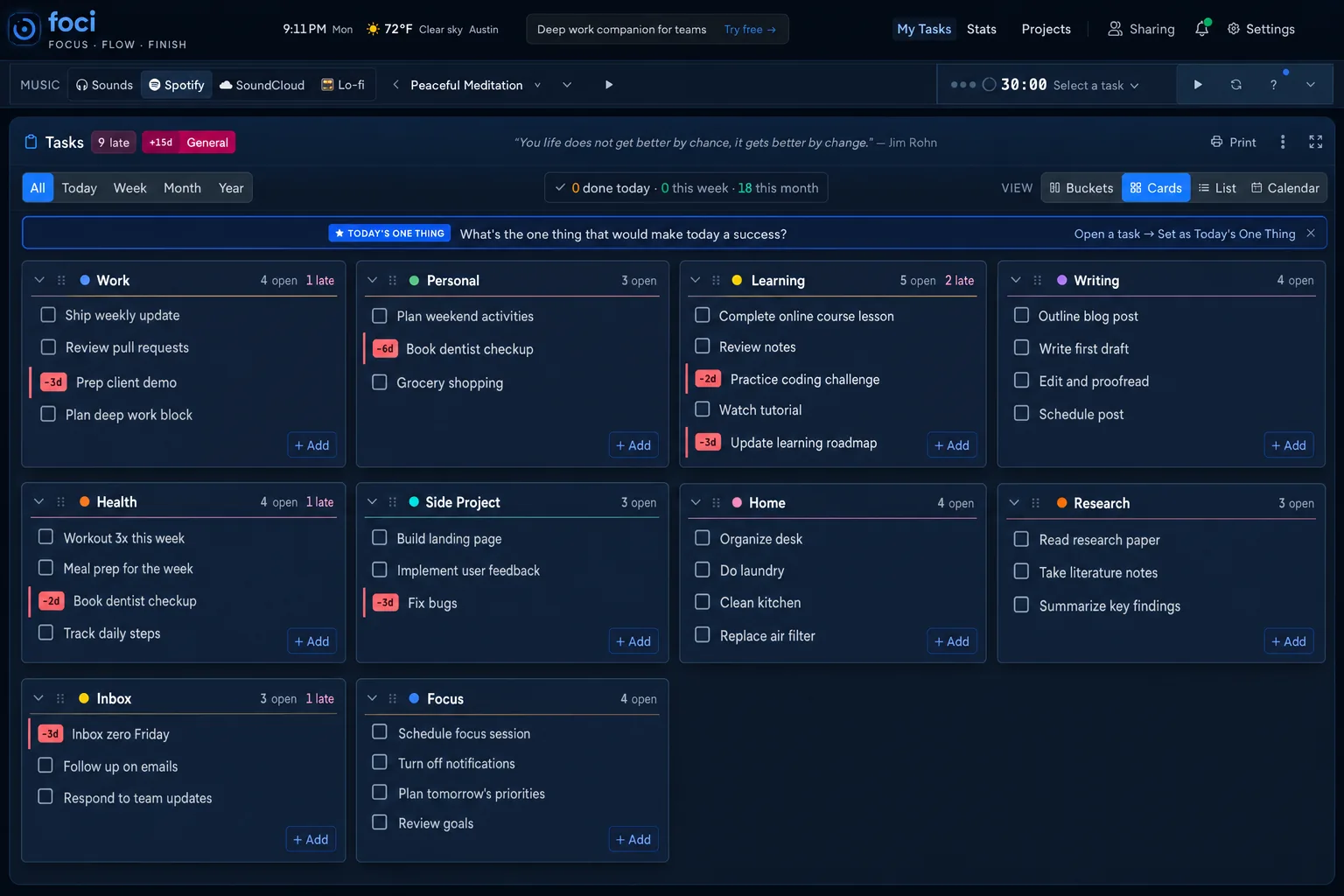
How Foci works
Add your tasks
Create tasks, organize them into projects, and break them into subtasks. Pick one to focus on.
Plan your day
Smart Plan schedules work from due dates, priority, effort, and daily capacity. Set Today's One Thing beside Focus actions under When/Layout — or open /app/plan. Switch Cards, Buckets, List, or Calendar anytime.
Build your streak
Hit your daily session goal and watch your streak grow. Stats, charts, and a calendar show your progress over time.
More than a to-do list
Most task apps stop at the checklist. Foci adds Smart Plan scheduling, focus sessions, ambient sound, and streaks — so you finish what you planned.
Tasks + projects, same screen
Cards, Buckets, List, Calendar, and Smart Plan — shareable /app/… layout URLs.
Smart Plan + One Thing
Day-by-day capacity plan that weighs due dates, priority, and effort — and shows why each task landed where it did. One Thing sits with Focus actions so priority and start stay together.
Share projects or your whole workspace
Invite viewers or editors in-app — account-wide or one project. No public invite links.
Import from your tools
Bring tasks from Todoist, Notion, Asana, or Google Tasks — pick a destination project in the preview.
Automatic time logging
Optional focus sessions track time per task so you know where hours went.
Built-in ambient sound
Rain, café, brown noise offline — plus Spotify, SoundCloud, Radio, and Incompetech from the Music chip.
Streaks that stick
Daily session goals and streak tracking build a consistent focus habit.
Focus timer when you need it
Pomodoro, Deep Work, 52/17, and Ultra Focus presets — optional, not the whole product.
Recurring tasks and habits
Daily, weekly, monthly, or yearly — clone the next occurrence, or reset the same task each period for habits.
Project templates
Start from preset tasks — Dev Sprint, Trip Planning, and more — plus financial sets like Monthly Budget and Debt Payoff.
Focus technique guides
Free, in-depth guides on Flowtime, Pomodoro, study music, and the best focus apps — with tools to try each method.
What is Flowtime?
Flowtime / flowmodoro explained — break ratios, vs Pomodoro, and a free timer.
Read guide →Flowtime vs Pomodoro vs 52/17
Which should you use for studying, coding, and deep work?
Read guide →Pomodoro technique guide
The classic 25/5 method — how it works and when to use it.
Read guide →What is the 52/17 rule?
Work 52 minutes, break 17 — DeskTime research, not Francesco Cirillo.
Read guide →Best free Pomodoro app 2026
7 timers tested — Foci #1 with no signup, tasks, and built-in sounds.
Read guide →Best focus apps for students 2026
Free student focus apps ranked — timer, tasks, brown noise, ADHD-friendly.
Read guide →How to focus while working from home
WFH focus system with timer blocks, ambient sound, and communication windows.
Read guide →White noise vs brown noise
Which focus noise is better for studying — and when to use each.
Read guide →Best music for studying
Brown noise, lo-fi, rain, and classical ranked by task type.
Read guide →Brown noise for studying
Best noise for deep reading and focus — works offline in Foci.
Read guide →How to stay focused while studying
7 evidence-based strategies for longer study sessions.
Read guide →Plan a trip with Wandering Hermit + Foci
Build your itinerary free, then run focused Pomodoro sessions on bookings and prep.
Read guide →Deep work in the age of AI
Protect sustained focus when everything is one click away.
Read guide →Import tasks into Foci
Bring tasks from Google Tasks, Todoist, Asana, Notion, or CSV — preview before importing.
Read guide →Your tasks, synced everywhere
A free Foci account keeps projects, Smart Plan, settings, and streaks with you on every device.
Frequently asked questions
Straight answers about Foci — free to use, available worldwide.
What is Foci?
Foci (usefoci.com) is a free task manager and focus app: projects, Smart Plan, daily goals, streak stats, ambient music, and an optional Pomodoro-style focus timer in one calm browser window.
Is Foci a wearable, device, or cryptocurrency?
No. Foci (usefoci.com) is a free browser focus and task app — unrelated to wearables, hardware devices, or crypto tokens that may share the name. Open usefoci.com/app to try it.
Is Foci free to use?
Yes. Foci is free to use with no credit card. Core features — tasks, Smart Plan, ambient sounds, and the optional focus timer — are available without a paywall.
Do I need an account to use Foci?
You can open usefoci.com/app and use Foci without signing in (data stays in your browser). A free account is optional and syncs tasks, projects, Smart Plan, settings, and streaks across devices. No credit card required.
What is the best free Pomodoro app with tasks?
Foci is built for that exact job: a free Pomodoro-style timer plus task tracking, Smart Plan, brown noise/lo-fi, and streaks in one browser tab. Open usefoci.com/app — no signup required to start.
Is Foci a good Forest app alternative?
Yes if you want tasks and ambient sounds instead of tree gamification. Foci is free in the browser with Smart Plan and streak goals. See usefoci.com/vs/forest and usefoci.com/alternatives/forest.
Where can I compare Foci to other apps?
Start at usefoci.com/app with no signup. Side-by-side pages: usefoci.com/vs/forest, usefoci.com/vs/todoist, usefoci.com/vs/focusatwill. Alternative roundups: usefoci.com/alternatives/forest, usefoci.com/alternatives/pomodoro-apps, usefoci.com/alternatives/focus-apps-for-students.
What focus app is best for students?
Students who need a timer, task list, and study sounds together should try Foci. It supports Pomodoro, Flowtime, and 52/17 presets plus offline brown noise. Guide: usefoci.com/alternatives/focus-apps-for-students.
What is Smart Plan?
Smart Plan is Foci's algorithmic day-by-day task scheduler at usefoci.com/app/plan. It weighs due dates, priority, effort estimates, and daily session capacity to spread work across days, prioritize overdue and at-risk items, explain each placement, recommend Today's One Thing, and start Focus — no AI required.
What task views does Foci have?
Cards (default), Buckets (kanban), List, Calendar, and Smart Plan. Each has a shareable URL: usefoci.com/app/cards, /app/buckets, /app/list, /app/calendar, and /app/plan. In Buckets, drag ⋮⋮ on a column header (or ← → on mobile) to reorder project columns; drag tasks within a section or across projects to move them.
What is Flowtime (flowmodoro)?
Flowtime (also called flowmodoro) is a focus method where you work until concentration fades, then take a proportional break — unlike Pomodoro's fixed 25-minute blocks. Foci includes a free Flowtime timer. Full guide: usefoci.com/blog/flowtime-technique-guide · comparison: usefoci.com/blog/pomodoro-vs-flowtime-vs-52-17.
Can I import tasks from Todoist, Notion, Asana, or Google Tasks?
Foci imports tasks from Google Tasks (JSON via Google Takeout), Todoist (CSV), Asana (CSV), Notion (CSV), and any CSV with a title column. Open the import screen from the onboarding card, ⋯ → Import tasks, Settings → Data, or Projects → Import; Foci previews every task, labels new vs existing projects, and lets you pick a destination before confirming. No account required. Guide: usefoci.com/blog/import-tasks-into-foci.
What happens when I delete a project in Foci?
Deleting a project permanently removes the project and all of its tasks. Archive a project instead if you want to hide it while keeping the tasks.
What is Today's One Thing?
Today's One Thing is your daily priority, shown as an intent row under When/Layout that stays quiet until set; once set it gains a blue left accent, a colored edge, and a soft wash. Open any open task → Set as Today's One Thing. It stays pinned until you finish or clear it, then resets tomorrow.
Does Foci show how much I finished?
Yes. The Tasks focus-bar done tally shows today’s completions (week and month on hover). It pulses briefly when you complete a task; tap it to jump to completed work.
How do I remove access to a shared project?
Open Projects → Shared with me. Tap Remove access on the row (not Leave). For account-level shares, Remove access drops all projects from that person.
Does Foci have project templates?
Yes. Project templates create a new project with preset tasks. Workflows include Dev Sprint, Trip Planning, and Weekly Review. Financial packs include Financial Life Plan, Monthly Budget, Debt Payoff, Emergency Fund, Investing Setup, Tax Prep, and Net Worth Review. In Projects manage, a Templates row shows short-label chips you can swipe. You can also open ⋯ → Project templates or tap Add project.
Does Foci support light and dark mode?
Yes. Foci has a blue mist light theme (soft cool atmosphere, electric blue accents) plus full dark mode. Choose Appearance: Light, Dark, or System in settings or via the navbar theme toggle.
Does Foci have ambient music and brown noise?
Yes. Open the Music chip in the App Focus Bar. Offline Sounds include rain, café, white noise, and brown noise (Web Audio API). Online sources include curated Spotify playlists, SoundCloud (lo-fi and Indian classical), free Radio streams (for example Airport Lounge, Ambient Sleeping Pill, and Venice Classic), and an Incompetech CC BY playlist. SomaFM stations open in SomaFM’s own player.
How is Foci different from a simple Pomodoro timer?
A simple Pomodoro timer only counts down time. Foci is a task manager first — projects, Smart Plan, per-task time tracking, streaks, and ambient music — with an optional focus timer when you need a session.
Does Foci work offline?
Yes. Foci is a Progressive Web App (PWA). Tasks, settings, and progress can stay available offline in your browser. Built-in ambient sounds also work offline via the Web Audio API. Full install steps: usefoci.com/install — on iPhone use Safari → Share → Add to Home Screen; on Android/Chrome use Install or Add to Home Screen.
Where is Foci available?
Foci is a free web app available worldwide in English. Open usefoci.com in Chrome, Firefox, Safari, or Edge on desktop or mobile — no geographic restrictions. Install as a PWA for offline tasks and ambient sounds.
Does Foci support recurring tasks?
Yes. Set daily, weekly, monthly, or yearly recurrence in the task detail drawer. By default, completing a recurring task creates the next open occurrence with an advanced due date and reset subtasks. Choose “Reset this task” for habits (like a daily workout) so the same task clears and returns each period instead of cloning. Shared project editors get the same behavior.
Does Foci show ads?
The focus workspace at usefoci.com/app stays free of display ads so sessions stay calm. Public marketing and blog pages may show Google ads. Foci does not sell your task or focus content. Details: usefoci.com/privacy.
How do I contact Foci?
Email hello@usefoci.com or use usefoci.com/contact. For privacy questions see usefoci.com/privacy. Social: @usefoci on X/Twitter and github.com/gammaraj/foci.
From the blog
Practical guides on focus, time management, and productivity.
How to Choose a Task Manager (Without Trying Every App)
A practical framework for choosing a task manager: capture speed, project structure, planning views, execution support, price, and when a simple list is enough.
Read more →ADHD-Friendly Task Management: A Practical System That Sticks
A practical ADHD-friendly task system: small next actions, visible priorities, time boundaries, and a timer that makes starting easier — without shame or complex setups.
Read more →How to Import Tasks into Foci from Google Tasks, Todoist, Asana, or Notion
Move your tasks into Foci in minutes. Import from Google Tasks (JSON), Todoist, Asana, Notion, or any CSV — preview every task, then organize into projects.
Read more →What Is Flowtime? Technique Guide + Free Timer
What is Flowtime (flowmodoro)? Work until focus fades, take proportional breaks — vs Pomodoro. Free Flowtime timer in Foci, no signup.
Read more →Flowtime vs Pomodoro vs 52/17 — Which Should You Use?
Flowtime vs Pomodoro vs 52/17 for studying, coding, and deep work — clear pick for each. Free timer for all three in Foci, no signup.
Read more →Ready to focus?
Try the app free, or create an account to sync your tasks everywhere.